


Did you know that businesses worldwide spent over $115.4 billion on mobile banner ads in 2023? As more people use their phones daily, advertisers depend on mobile banner ads to reach their audience in a simple and cost-effective way.
Mobile banner ads appear as small banners at the top or bottom of a mobile app or website. These types of ads are easy to notice without disrupting the user experience.
Even with newer ad formats like video and native ads, mobile banner ads remain a popular choice because they are more affordable, easy to set up, and widely used.
On Android, mobile banner ads offer the best value, costing $3.73 per action, which is 22% cheaper than native ads ($4.55 per action).
Mobile banner ads also have a higher engagement rate, with 38.1% of users taking action after seeing a banner ad, compared to 35.8% for native ads.
So are you ready to make your mobile banner ads work? This guide gives you practical tips about how they work, best formats, design tricks, and real examples. Learn to create effective ads that boost clicks and revenue.
What are Mobile Banner Ads?
Mobile banner ads are small rectangular advertisements that appear within mobile devices in apps or websites. They are designed to grab user attention without interrupting the browsing experience.
These ads are popular in mobile advertising because they are affordable, easy to set up, and effective for driving clicks, app installs, and conversions.
Read: In-App Advertising: How to Monetize Mobile Apps Like a Pro
Common Placements of Mobile Banner Ads
To maximize visibility and engagement, mobile banner ads are strategically placed in two areas:
- Top of the screen: Ensures immediate visibility when a user opens an app or webpage.
- Bottom of the screen: A less intrusive placement that still captures attention as users scroll.
Types of Mobile Banner Ads
Mobile banner ads usually comes in the shape of:
- Static Banner Ads
- Simple, image-based ads with a fixed design.
- Load quickly, ideal for apps and websites where speed is crucial.
- Best for promoting brand awareness with clear, visually appealing messages.
- Example:
- Hult International Business School’s one-year master’s degree banner ads on puzzle game apps.
- Applications: Common in mobile games, news apps, and educational platforms (e.g., puzzle games, news aggregators).
- Purpose: Builds brand awareness by presenting a simple, clear message in a fast-loading format.
- User Response: Users see the ad while playing but do not interact directly, reinforcing brand recognition passively.

- Animated Banner Ads
- Contain moving elements or transitions to grab more attention.
- Perform better than static ads in terms of engagement, but may take longer to load.
- Great for campaigns that need eye-catching, dynamic content.
- Example:
- Ford Motor Co.’s animated banner ads on the CNBC mobile site, powered by Microsoft.
- Applications: Used in business news mobile site, CNBC.
- Purpose: Encourages users to click and explore Ford’s mobile showroom, boosting traffic to the brand’s website.
- User Response: Users who click can browse vehicles, request brochures, get trade-in values, and request quotes, increasing lead generation.

- Rich Media Banner Ads
- Interactive ads that can include videos, slideshows, or buttons.
- Designed to boost engagement by encouraging users to interact.
- Commonly used for high-impact brand awareness and product promotions.
- Example:
- Subway’s interactive banner ads
- Applications: Found in lifestyle, utility, and entertainment apps such as APUS Launcher, Clean Master, Badoo, CM Security, Shazam.
- Purpose: Engages users with interactive elements, leading them to a landing page for new menu items and directing them to nearby Subway restaurants.
- User Response: User interaction increased because more users clicked on the ad, which directed them to a landing page where they could learn about the new sub and find the nearest restaurant.

Benefits of Mobile Banner Ads
Here are some of the benefits of using mobile banner ads in your advertising strategy.
- Cost-Effective Advertising: Mobile banner ads offer a budget-friendly advertising solution. This ad is suitable for businesses of all sizes
- Wide Reach: Mobile banner ads help brands reach millions of potential customers across various mobile apps and websites.
- Non-Intrusive Format: Mobile banner ads don’t interrupt the user experience. They appear at the top or bottom of the screen, allowing users to engage with content while still noticing the ad
- Versatility: Effective for various marketing objectives, including:
- Brand awareness
- Driving website traffic
- Boosting conversions.
How Mobile Banner Ads Work
The effectiveness of mobile banner ads depends on three core processes:
- Targeting:
- Advertisers use audience data such as demographics, location, device type, browsing behavior, and app usage to display ads to relevant users.
- Advanced targeting options include contextual targeting (based on the content users are viewing) and behavioral targeting (based on past actions and interests).
- Retargeting strategies allow brands to reach users who have previously interacted with their website or app, increasing the likelihood of conversion.
Read: How to Identify Your Game’s Target Audience: A Practical Guide
- Ad Serving:
- Ad networks and demand-side platforms (DSPs) deliver mobile banner ads through real-time bidding (RTB) or direct deals with publishers.
- The process begins when a user opens an app or mobile website and triggers an ad request.
- Advertisers bid on available ad slots, and the winning ad is displayed almost instantly.
Read: What Is Programmatic Advertising? A Comprehensive Beginner’s Guide (2025)
- Metrics Tracking:
- Advertisers monitor ad performance using key performance indicators (KPIs) such as:
- Impressions: The number of times an ad is displayed.
- Click-Through Rate (CTR): The percentage of users who click on the ad after viewing it.
- Conversion Rate: The percentage of users who complete a desired action after clicking the ad.
- eCPM (Effective Cost Per Mille): The revenue generated per 1,000 ad impressions.
- Tracking user engagement and interaction helps advertisers refine their strategies and improve ROI.
- Advertisers monitor ad performance using key performance indicators (KPIs) such as:
Read: How to Calculate Return on Investment (ROI) for Mobile Apps
Goals Advertisers Achieve
Mobile banner ads help advertisers achieve several key marketing objectives:
- Driving App Installs: Encourage users to download their apps.
- Boosting Website Traffic: Redirect users to their websites to increase visits and engagement.
- Encouraging Purchases: Promote products and special discounts to attract buyers. Additionally, integrating mobile payment solutions or “Buy Now” buttons can streamline the checkout process and improve conversions.
Ad Refresh Mechanisms
Mobile banner ads use refresh mechanisms to stay visible and engaging without overwhelming users.
- Timed Refreshes: Ads update automatically every 30–60 seconds, showing new content and increasing revenue opportunities. This allows multiple advertisers to bid for the same ad space.
- User-Initiated Refreshes: Ads reload when users navigate to a new screen or refresh content to keep ads relevant and engaging.
- Frequency Capping: Limits how often the same ad appears to prevent ad fatigue.
Mobile Banner Ad Sizes and Formats
Mobile banner ads come in various sizes and formats to fit different mobile devices and applications. The Interactive Advertising Bureau (IAB) has standardized several common ad sizes to ensure compatibility across platforms. Additionally, some non-IAB-standardized sizes, like the Large Mobile Banner, perform exceptionally well in Google AdSense.
Common Mobile Banner Ad Sizes
These standard banner sizes are widely used in mobile advertising:
- 320×50 pixels (Smartphone Banner):
- One of the most commonly used mobile ad sizes.
- Ideal for placement at the top or bottom of an app or mobile webpage.
- Minimal screen space consumption ensures a non-intrusive user experience.

Example:
- Temu ad in the Period Calendar Period Tracker app:
- Prioritizes a lightweight and non-intrusive user experience.
- Allows users to track cycles without disruption.
- Temu’s targeted advertising reaches audiences with a high likelihood of shopping interest.
- Increases product visibility and drives conversions.
- 300×50 pixels (Small Banner):
- A more compact version of the smartphone banner.
- Useful for apps with limited space or minimalist design requirements.
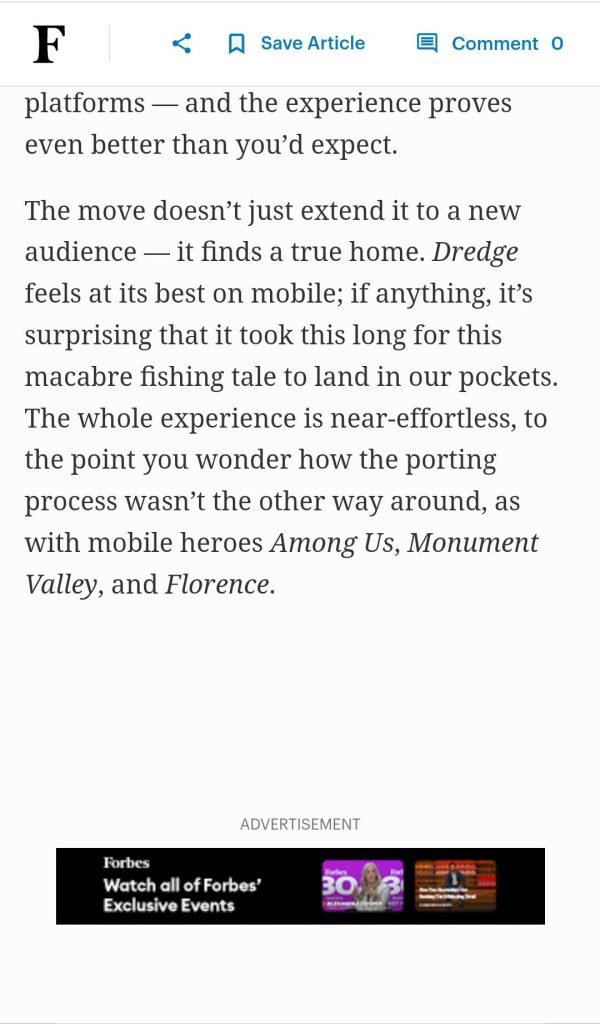
Example:
- Forbes ad in Forbes Mobile:
- The small and compact 300×50 banner fits seamlessly within the Forbes Mobile app’s content layout.
- Allows Forbes to promote its exclusive events without taking up too much space
- Ensures users remain engaged with the platform while increasing event registrations.
- 300×250 pixels (Medium Rectangle):
- A versatile size that is widely used in both mobile apps and websites.
- Provides a good balance between size and engagement, making it popular for advertisers.
- Often placed within content feeds for better visibility.

Example:
- MasterCard ad in the BBC Mobile app.
- The versatile 300×250 banner provides enough space for visually engaging ads while fitting well into BBC Mobile’s news content.
- Allows MasterCard as a financial services company to effectively promote its services to a global audience
- BBC benefits from monetizing premium ad space without compromising the reading experience.
- 728×90 pixels (Leaderboard):
- Designed primarily for tablets in landscape mode.
- Offers a wider display area for enhanced visual appeal.

Example:
- ThreatLocker ad on Entrepreneur site on tablet device
- The wide 728×90 leaderboard banner is ideal for desktop and tablet displays.
- Ensures high visibility at the top of Entrepreneur’s pages.
- Allows ThreatLocker as a cybersecurity company to attract businesses and IT professionals interested in cybersecurity.
- Entrepreneur websites benefit from a premium ad format that generates revenue without disrupting its business content.
- 320×100 pixels (Large Mobile Banner): Although not part of the IAB Mobile standard ad units, this ad size is a top-performing AdSense size.
- The taller design makes ads more noticeable without being intrusive.
- Allows for larger text and clearer branding, improving click-through rates (CTR).
- Frequently used as an alternative to 320×50 and 300×250 banners.

Example:
- Aramco ad in Forbes Mobile:
- The 320×100 banner offers more space for impactful messaging.
- Ideal for informative and awareness-driven ads.
- Aramco effectively communicates its commitment as an oil and gas company to innovation and sustainability.
- Forbes benefits by displaying a high-performing AdSense format
Responsive and Smart Banners
Mobile banners should be adaptable to different screen sizes and resolutions to enhance user experience and ad performance.
- Responsive Banners: Adapt to various screen resolutions and orientations, ensuring optimal display across devices.
- Smart Banners: Automatically adjust their dimensions to fit the screen width, maintaining a consistent appearance.
Banned or Deprecated Banner Sizes
Certain ad formats are discouraged or prohibited due to their negative impact on user experience:
- Pop-ups and Interstitials without Proper Timing: Ads that appear unexpectedly and disrupt user activity.
- Ads Occupying More Than 30% of the Screen: Overly large ads that overshadow content.
- Non-Responsive or Overlapping Ads: Ads that do not adjust to different screen sizes or obscure other content.
Key Considerations for Choosing Ad Sizes
Selecting the right ad size is crucial for balancing user experience, engagement, and monetization.
- Match Banner Sizes to App Layout: Check to see that ad dimensions complement the design and layout of the app or website.
- Optimize for User Experience and Performance Metrics: Select sizes that provide a balance between visibility and non-intrusiveness, aiming for higher engagement rates.
Best Practices for Designing Mobile Banner Ads
Creating effective mobile banner ads requires a combination of compelling visuals, clear messaging, and strategic design. Because mobile screens are limited in size, advertisers must make the most of the available space to capture user attention and drive engagement.
Here are the best practices to optimize mobile banner ad performance.
Keep It Simple
Mobile banner ads should communicate their message quickly and effectively. Given the small screen space, a cluttered ad can confuse users and lower engagement.
- Use a short, impactful copy (5–7 words) such as “20% Off Winter Wear – Shop Now” that gets the message across instantly.
- Avoid excessive text, focus on one key benefit or offer.
- Maintain a strong visual hierarchy, ensuring the most important message (for example, a discount or call to action) stands out.
- Ensure the text is readable with appropriate font sizes and contrasting colors.
Use High-Quality Visuals
Visual appeal images play an important role in capturing user attention. Poorly designed ads with blurry or irrelevant images can decrease credibility and engagement.
- Use high-resolution images that are optimized for mobile screens.
- Maintain brand consistency by using company colors, logos, and fonts.
- Avoid excessive details, use simple and bold images that work best on smaller screens.
- Consider using motion graphics or animations for added engagement in rich media ads.
Incorporate CTAs
A strong Call-to-Action (CTA) encourages users to take the desired step, whether it’s making a purchase, signing up, or downloading an app.
- Place the CTA prominently within the banner.
- Use action-oriented words such as “Shop Now,” “Get Started,” “Download Free,” or “Learn More.”
- Make the CTA button stand out with contrasting colors.
- Ensure the CTA is large enough to be tappable without accidental clicks.
Optimize for Load Speed
Slow-loading ads can frustrate users and lead to lower engagement rates. Optimizing for performance can help users get seamless experiences.
- Use compressed images and lightweight graphics to prevent slow loading times.
- Avoid heavy animations or excessive use of JavaScript.
- Utilize AMP (Accelerated Mobile Pages) ads to improve speed and performance.
- Test ad performance across different mobile devices and networks to ensure quick loading.
A/B Testing
Testing different ad versions helps advertisers understand what resonates best with their audience.
- Experiment with different ad creatives, CTAs, colors, and messaging. For example, if an ad with a red “Buy Now” button performs better than one with a blue button, use the red variation in future campaigns.
- Analyze key metrics such as Click-Through Rate (CTR), Conversion Rate, and Engagement Rate to determine effectiveness.
- Use heatmaps and analytics tools to track where users are clicking.
- Continuously refine ads based on performance insights.
Read: What is Performance Marketing? A Complete Guide
Real-Life Examples of Effective Mobile Banner Ads
One of the signs of a successful mobile banner ads is its ability to blend seamlessly into the user experience while driving engagement and conversions. Here are several real-world examples of mobile banner ads that work and the strategies behind their success.
Waze
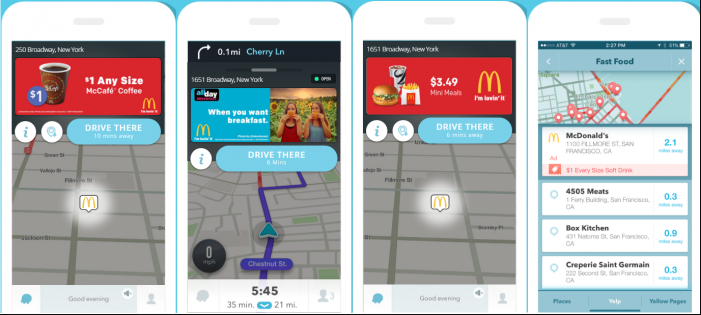
Waze, a navigation app, uses contextual and location-based targeting to display relevant ads to users. Here’s why their banner ads are effective:
- Ads appear as small, non-intrusive banners at top or bottom of the screen, ensuring they do not interfere with navigation.
- Waze displays location-based ads that are relevant to users’ current driving context, such as nearby gas stations or restaurants.
- Businesses can take advantage of geo-targeting to promote nearby stores, restaurants, and gas stations, increasing foot traffic.
Spotify
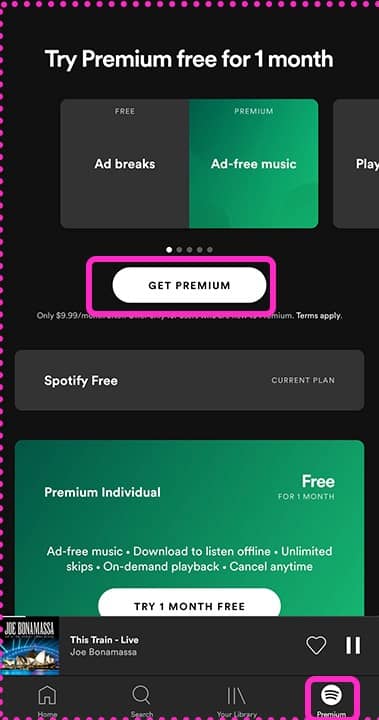
Spotify, a digital music service, relies on data-driven advertising, showing banners that match a user’s music preferences and listening habits. These ads are effective because:
- Engaging visuals and clear CTAs such as, “Get Premium” for premium memberships to encourage conversions.
- Spotify places banners at the bottom of the screen to ensure visibility without disrupting the music experience.
Casual Mobile Games
Many free-to-play mobile games, such as Candy Crush and Subway Surfers, feature banner ads that offer in-game rewards.

- Ads are strategically placed between game levels or at the bottom of the screen to maintain engagement.
- Ads blend into the app experience and encourage user interaction by offering rewards through gamified CTAs like “Watch to earn extra lives” or “Claim bonus points.”
Read: In-Game Advertising: The Future of Brand Engagement in Gaming
Conclusion
Mobile banner ads remain a powerful and cost-effective tool for advertisers looking to reach a wide audience while maintaining a seamless user experience. You can enhance visibility without disrupting engagement by strategically placing ads at the top or bottom of mobile screens.
Want to take your mobile banner ad strategy to the next level? Explore how TyrAds can help you create and optimize high-performing banner ads to maximize ROI. Contact us today to get started!