


Launching an app is exciting, but also nerve-wracking. You’ve poured time and money into development, you’ve planned your marketing push, and now you need to make sure people actually install your app.
That’s when mobile landing pages come to play. It acts as the first opening step in converting visitors into users.
Whether you’re preparing for launch, running paid campaigns, or optimizing for organic traffic, your landing page isn’t just a nice-to-have. It’s your conversion engine.
In this guide, you’ll discover best practices, common pitfalls, and real-world examples to help you build a mobile app landing page that actually drives installs.
Why a Great Landing Page Is Essential for Mobile Apps
The reality is, your landing page plays a huge role in whether your app succeeds or flops. You need a strong first impression to stand out among countless apps and avoid wasting your ad budget.
It’s All About Conversion
Your mobile app landing page isn’t just a digital flyer, it’s your best salesperson. Mobile app landing pages can turn curious visitors into users.
A good landing page sticks to one main goal, whether that’s getting people to sign up, download an app, or join an email list before launch.
Read: Mobile App Conversion Rate Optimization
Website vs. Landing Page: Know the Difference
Think of your website as the entire storefront and your landing page as the product demo table. Websites offer multiple paths and distractions. A great app landing page is focused. It’s one page, one purpose: get the install.
This distinction is important, especially for startup founders and growth marketers trying to stretch every ad dollar.
Core Elements of a High-Converting App Landing Page
One thing you should remember when it comes to landing pages is that clarity sells. When users land on your page, they should instantly know what your app does, why it matters, and what to do next.
Let’s break down the essential building blocks of a mobile app landing page:
Headline: Clear, Benefit-Driven
Your headline is your hook. Skip the buzzwords. Lead them with a promise that speaks directly to your audience.
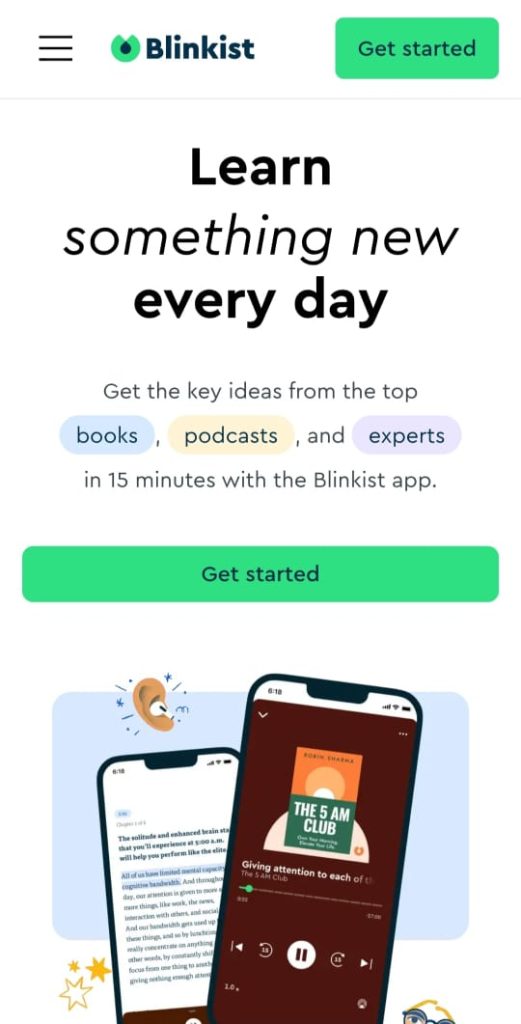
Example: Blinkist
Headline: “Learn something new every day.”
This headline delivers a clear, benefit-oriented message: Blinkist helps users build a daily habit of learning by offering key insights from top books, podcasts, and experts in just 15 minutes.
Subheadline: Support Your Core Value
Use a short sentence to reinforce your main value or provide additional clarity.
Example: Calm

Subheadline: “We’re here to help you feel better.”
This subheadline complements the headline (“Calm your mind, change your life”) emphasizing the app’s commitment to improving users’ well-being .
Hero Image or Video: Show, Don’t Just Tell
Users need to see your app to trust it. You can use:
- Clean mobile screenshots (highlighting real UI)
- Short app demo videos
- Looping GIFs for feature teasers
Example: YAZIO

YAZIO’s landing page showcases vibrant images of healthy meals and intuitive app interfaces, allowing users to visualize tracking their nutrition and progress.
Call-to-Action (CTA): Clear and Compelling
Your CTA should be singular, unmistakable, and aligned with your platform’s goals.
Example: Ibotta

Ibotta’s landing page presents the CTA: “Get the free app”. This CTA is strategically displayed and encourages users to download the Ibotta app, emphasizing its free availability. It aligns with Ibotta’s value proposition of helping users earn cash back on everyday purchases.
Social Proof: Let Others Do the Selling
Social proof builds trust quickly and trust drives action. Let your users give reviews and testimonials do the selling for you.
Example: Calm

Calm’s landing page includes testimonials from users, such as:
“When I cannot fall asleep, I turn on this app and am out within 5 minutes.”
These authentic reviews enhance credibility and encourage new users to try the app .
Feature Highlights: Benefits Over Features
Instead of listing technical specifications, showcase how your app improves users’ lives. Use visual elements like icons or concise blocks to convey these benefits effectively.
Example: Airbnb

Like Airbnb’s recent updates where they highlight a comprehensive travel experience. Users can now book homes, services, and experiences, all in one place.
These highlights showcase Airbnb’s expansion beyond accommodations to offer a full suite of travel services.
Mobile-First Design Principles
You’d be surprised how many app landing pages still feel like they were built for desktops in 2012. You need to remember that your users are mobile. So your page needs to be too.
Responsive Design is Non-Negotiable
Your landing page should look flawless on any screen size. If things are out of place or the CTA button is hard to find on mobile, you’re losing potential customers. Use tools like BrowserStack or just an old-fashioned device test to spot issues early.
Prioritize Vertical Scrolling, Large Tap Targets, Fast Loading
Mobile users don’t click, they tap and scroll. Design for that:
- Keep tap targets (like buttons) at least 48px tall.
- Stick to a single-column layout.
- Compress images for faster load speeds.
Why it matters: According to Google, 53% of users abandon a site that takes longer than 3 seconds to load on their mobile.
Platform-Specific CTAs
Here’s a common mistake: using generic “Download Now” buttons with no platform differentiation. Fix it by using:
- Apple’s official App Store badge.
- Google Play badge.
- Smart banners or deep links when possible.
We can say that platform-specific CTAs help people to trust your page, reduce confusion, and make it easier to download your app.
So, when users see the right button for their device, like iPhone or Android, they know exactly where they’re going. This strategy may lead to more increase in conversion rates.
Spotify’s mobile website is a great example. It features sleek, platform-specific download buttons and can detect your device type to automatically direct you to the correct app store.
Tips for App Pre-Launch Pages
Pre-launch is the best time to get people excited and interested, but sometimes many teams don’t take this moment seriously enough. Here’s some tips:
Collect Emails for Launch Notifications
Your goal isn’t just awareness, it’s building a list of warm leads. Add a simple signup form (name + email) above the fold with a compelling CTA.
Boost signups with:
- Offering incentives such as:
- In-App Rewards like credits, coins, or points that can be used once the app is live.
- Free premium features even just for a limited time.
- Referral bonuses when users get friends to sign up before launch.
- Early access.
- Beta invites.
- Sneak peek on apps’ features.
Example: Pandadoc

The PandaDoc pre-launch invitation was meant for early access to the application. Their pre-launch site offered early invitations in exchange for an email.
They invited users to test the product and engage with it before the official launch. This strategy helped PandaDoc gather feedback and build anticipation.
Read: How to Create a Referral Program: A Step-by-Step Guide for 2025
Tease Features with GIFs or Animations
You don’t need a full demo yet. Just enough motion to show what’s coming. Tools like LottieFiles or Loom can help you create quick, lightweight previews.
This can help build curiosity without overwhelming the visitor.
Example: Google Maps

With version 11.6.2, Google Maps introduced an animated splash screen where a ring of five colored segments (including two blues) dynamically transforms into the signature location pin. This visually engaging micro-interaction teases the app’s identity and polish, while offering users a satisfying, branded moment before the core experience begins.
Create Urgency with Countdowns or Exclusivity
A simple “Coming Soon” banner with a countdown timer can build anticipation. Add a “limited beta spots” message to fuel FOMO.
Example: Pool

The Pool app nails this approach with a vibrant, long-scrolling “Coming Soon” page. It communicates the app’s value with just a compelling copy and bold visuals.

The real magic happens after signup: the confirmation page celebrates with a confetti animation. Even better, it shows your waitlist rank and provides a personal invite link, subtly turning users into advocates and encouraging them to spread the word.
Mistakes to Avoid on Your App Landing Page
These common mistakes are surprisingly easy to make, but their solutions are straightforward once you know what to look for.
Too Many CTAs or Distractions
Your landing page isn’t a menu with too many options. It should be a focused sales pitch. So just stick to one primary CTA, not use “Download,” “Watch Demo,” and “Subscribe” all at once.
You can use supporting elements (like testimonials or feature blurbs) to drive toward a single action.
Vague Messaging or Buzzwords
If your headline says “Revolutionize the way you live,” users will bounce fast. Be specific. Lead with the user benefit, not vague promises.
Example of what NOT to do:
“Empowering your digital transformation journey.”
Example of what you SHOULD do:
“Track your meals and hit your health goals, all in one app.”
This version is clear, action-oriented, and directly communicates what the user gets.
Forgetting App Store / Google Play Buttons
This one might sound basic, but many landing pages are missing clear install links, or worse, they have links that don’t even open the app stores. The fix is simple:
- Use official store badges.
- Make sure the buttons work.
- Always test them on mobile.
Not Tracking Conversions or Scroll Behavior
It’s important to track your results to see what’s successful. If you don’t, you’re operating without knowing what’s really happening.
The good news is, the tools to help you do this are often free or simple to set up:
- Add Google Analytics or Mixpanel.
- Use Hotjar to track scroll depth and click heatmaps.
- Set up conversion goals tied to install CTAs.
Even small changes, like moving the CTA button higher, can boost conversions once you have data to back your decisions.
Read: Essential KPIs and Metrics for Mobile Games
Examples of Mobile App Landing Pages That Convert
Want to see how great design directly impacts app installs? We’ll break down a few app landing pages that are achieving great results and what you can steal from their strategies.
Blinkist: Clear Value + Focused CTA

Blinkist is a learning app that delivers 15-minute summaries of nonfiction books. Its landing page wastes zero time. The headline “Learn something new every day” sits front and center, followed by a subheadline that hammers home the benefit: “Understand the key ideas in 15 minutes.”
What they nail:
- One clear CTA: “Start your free trial”.
- Clean UI screenshots show exactly what you get.
- Social proof via user count and testimonials.
The clean design, focused CTA, and transparent trial details helps reduce friction, build trust, and guide users smoothly from interest to sign-up. These elements can contribute to higher conversion rates and more efficient marketing.
Calm: Minimalism + Proof-Driven Design
Calm’s aesthetic mirrors the product: peaceful, focused, clutter-free. The main CTA, “Try Calm for Free,” is bold and immediate. This is strategically followed by user testimonials and media mentions to build users’ trust.

What works:
- Consistent brand feel across visuals and messaging.
- Emotional hook in subheadline: “We’re here to help you feel better”.
- Clean, mobile-optimized layout.
Combining minimalist design with social proof, Calm creates a soothing yet persuasive user experience. This can help build trust quickly, ease decision-making, and gently guide visitors toward signing up.
YAZIO: Visual Storytelling + Social Trust
YAZIO’s nutrition tracker app leads with vibrant visuals of healthy meals, app screenshots, and real results. They also showcase social proof prominently, including user stats and Trustpilot ratings.

Why it converts:
- Eye-catching hero image.
- Clear feature-benefit breakdown.
- Credibility through verified reviews and download milestones.
YAZIO makes a powerful first impression that builds credibility quickly by combining strong visual storytelling with trust signals. This approach can helps convert health-conscious visitors into users who feel confident the app can support their goals.
Final Thoughts: Design with the Install in Mind
So, remember a mobile app landing page isn’t just a branding tool, it’s a performance asset.
Every element should drive installs through clear messaging, real value, and fast performance. Prioritize clarity, highlight benefits, and make sure the experience is smooth on mobile.
Whether launching or optimizing, this page sets the tone for all user interactions that follow.
Need help building or optimizing a landing page that actually drives installs? TyrAds can help. Our team specializes in mobile growth, conversion optimization, and user acquisition. Contact us now to learn more.